
Pharos Controller
Inclusion of the Pharos Designer/Expert Controller in a Control4 project is required to configure and control the use of either Pharos Expert or Pharos Designer controllers from a Control4 system.
The controller should be initially configured using Pharos Designer or Pharos Expert software. The controller should be configured as follows:
- The embedded web interface must be enabled.
- The embedded web server must be set to use HTTPS and the default port 443.
Linking the Controller in Composer Pro
After the Pharos Controller has been configured appropriately, add the Designer/Expert Controller driver to the project.
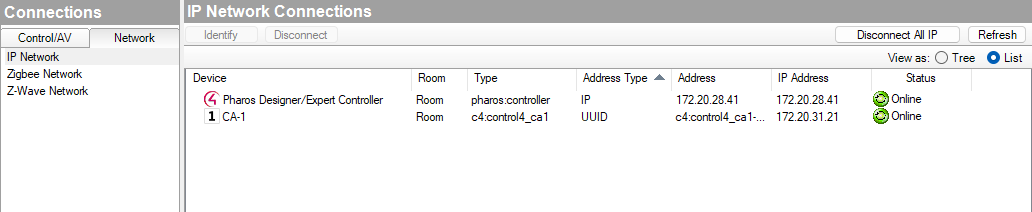
In order to communicate with the Pharos Controller, you will need to configure the IP address of the Pharos Controller in Composer Pro under Connections, in the Network tab.
In the network tab, double click on the Pharos Designer/Expert Controller to edit the IP address. Once configured and connected the controller will show as Online in Composer.
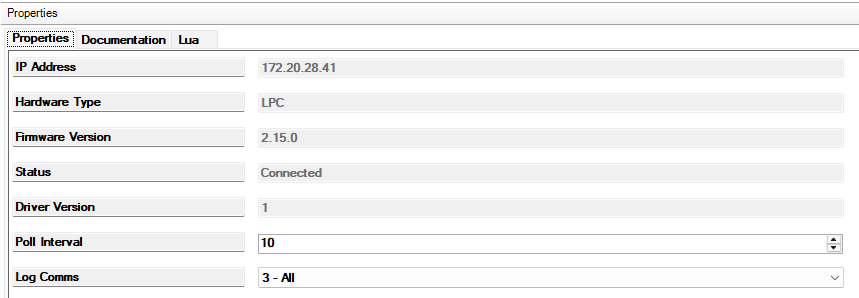
After the Pharos Controller is linked to the Control4 system the driver's property page will be populated with the Controller information:
Properties
The following editable properties of the driver are available:
- Username - For Controller with security enabled, this will be the username used. Leave empty if security is disabled
- Password - For Controller with security enabled, this will be the password used. Leave empty if security is disabled
- Poll Interval - For drivers which require polling, controls how frequently the controller will be polled for updates.
- Log Comms - For debugging purposes controls how much logging is performed. We recommend leaving this at the default unless troubleshooting.
Next Steps
In order to perform actions on a controller, you need to add one of the other Pharos drivers for the controller type and action you want to perform on the controllers. The other available drivers are:
- Space - allows control of spaces within a Pharos Expert system.
- Tagset - allows control of tags within a Pharos Expert system.
- Trigger - allows triggers to be fired in a Pharos Designer system.
Consult the documentation of these drivers for setup details.