
Pharos Tagset
The Pharos Tagset driver allows you to control tags in the Pharos Expert product.
In order to use the driver, the Control4 project must include a Pharos Controller driver to facilitate communication with the controller.
Exposed Variables
The driver exposes variables:
- Active Tag Name - returns the name of the active Expert Tag in the configured tagset.
- Active Tag Number - returns the number of the active Expert tag in the configured tagset.
Linking the Controller to the Tagset Driver
Once you have added a controller and a tagset driver, they must be linked.
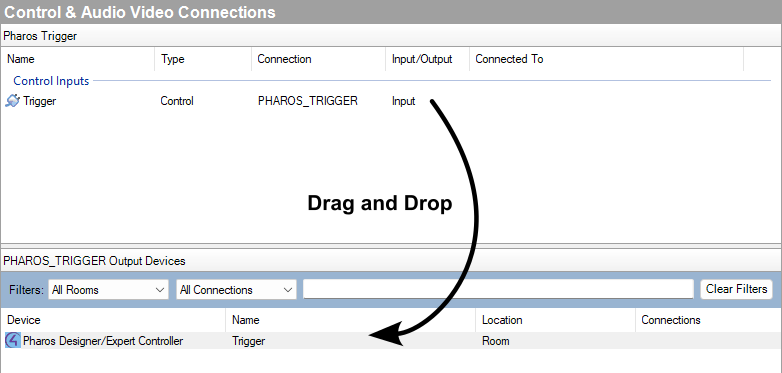
In Composer Pro, navigate to the Connections tab, select the tagset driver and drag and drop the input on to
the output:
Properties and Actions
In the System Design tab, configure the driver with the Expert Tag Set number you wish to control:
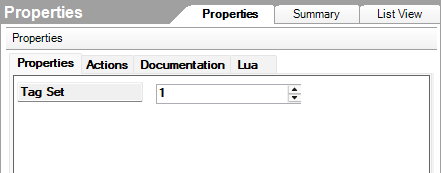
Once configured, navigate to the Actions page and press the Query Tags button to retrieve the available tags from the device.
Activating Tags
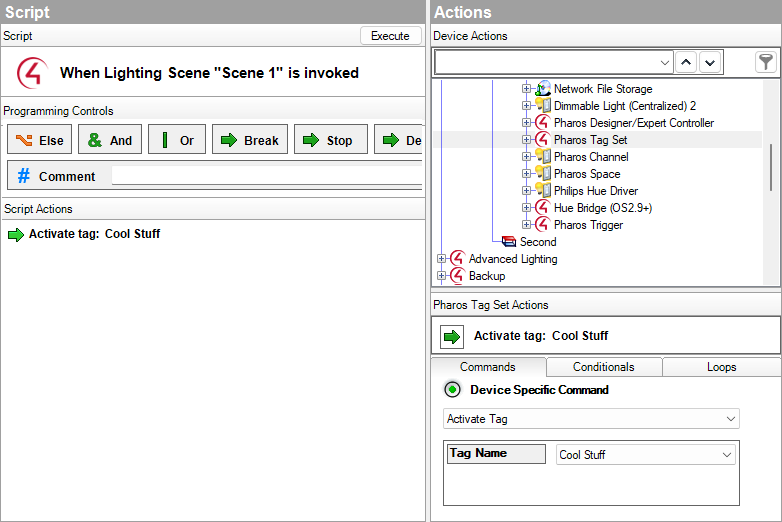
Once the available tag sets have been successfully queried, you can add activation of tags as Actions in the Programming tab of Composer Pro:
Reacting to Tag Activation
You can react to changes of the active tag in a tag set by expanding the Pharos Tag Set in the Device Events pane of the Programming tab. You can script actions in response to the active tag name or number changing.