Override Control Setup#
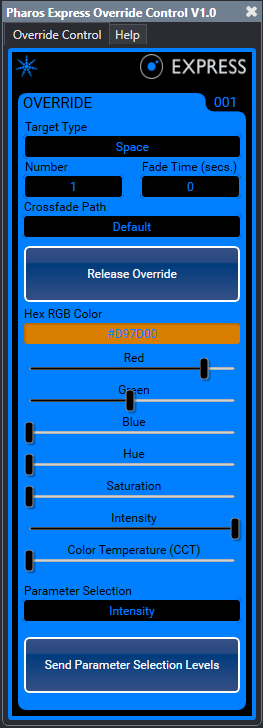
Runtime Elements#
Target Type
Space (default)
Fixture
Number
Group or Fixture object number to control
If group is selected for target type a group number of 0 will control ALL fixtures
Fade Time (secs.)
Fade time when setting or releasing the override in seconds (default 0)
Crossfade Path
Default (default)
Will use the path set within the controller configuration which is typically set to Linear
For a detailed explanation of the following paths please refer to the Express manual
Linear
Start
End
Braked
Accelerated
Damped
Overshoot
Col At Start
Col At End
Int At Start
Int At End
Colour First
Intensity First
Release Override
Releases the override
If a timeline or scene was previously playing prior to the override being set the timeline or scene will output upon the release of the override
Hex RGB Colour
Intended to interface the Q-SYS Colour Picker component to this plugin for colour mixing capabilities
The IRGB sliders will track the levels that the Colour Picker component are set to
Entering a 3 byte RGB level into this field will also update the IRGB sliders as well (e.g. #FF7F40)
The Colour Picker component will not update based on input to this control
The background colour of this control will update based on Colour Picker input or movement of the IRGB sliders
Colour Parameter & Intensity Sliders
Allows for 0-255 level control of the parameters selected within the Parameter Selection dropdown menu
Levels will not be sent until the Send Parameter Selection Levels button/pin has been triggered
Levels output are limited to the Parameter Selection chosen within the Parameter Selection dropdown menu
For example, if IRGB is selected as the Parameter Selection only intensity, red, green and blue slider levels will be sent once the Send Parameter Selection Levels button/pin is triggered
Parameter Selection
Intensity (default)
Formats command with intensity levels of the selected target
Intensity + CCT
Formats command with intensity and colour temperature levels of the selected target
CCT
Formats command with colour temperature levels of the selected target
IRGB
Formats command with intensity, red, green and blue levels of the selected target
HSI
Formats command with hue, saturation and intensity levels of the selected target
IRGB + CCT
Formats command with intensity, red, green, blue and colour temperature levels of the selected target
HSI + CCT
Formats command with hue, saturation, intensity and colour temperature levels of the selected target
Send Parameter Selection Levels
When triggered the Parameter Selection levels will be sent based on the level the Parameter Sliders are set to and the Parameter Selection dropdown
Designtime Properties#
Override Quantity
Choices
1-100 (default 1)
Released Button State
Pushed Button State
Control Pins#
Pin Name |
Input |
Output |
Values |
|---|---|---|---|
Disable |
✅ |
✅ |
0/false, 1/true |
Override Fade Time |
✅ |
✅ |
number |
Override Hex RGB Colour |
✅ |
✅ |
number |
Override Number |
✅ |
✅ |
string |
Override Parameter Selection |
✅ |
✅ |
string |
Override Path |
✅ |
✅ |
string |
Override Target |
❌ |
✅ |
string |
Override Release |
✅ |
✅ |
string |
Override Send Selected Parameters |
✅ |
✅ |
momentary true/false |
Override Blue Level |
✅ |
✅ |
0-255 |
Override CCT Level |
✅ |
✅ |
0-255 |
Override Green Level |
✅ |
✅ |
0-255 |
Override Hue Level |
✅ |
✅ |
0-255 |
Override Intensity Level |
✅ |
✅ |
0-255 |
Override Red Level |
✅ |
✅ |
0-255 |
Override Saturation Level |
✅ |
✅ |
0-255 |