API Key Management#
Some or all of the features in this topic are enabled on a per-portal basis.
An API key lets an external system make requests to a Pharos Cloud site without a person signing in. Anything holding a valid key has the access that key was issued with, so treat a key like a password.
Users must have the API Key management permission for the site to view and interact with API Keys.
Generate a key#
- Open the API Keys tab.
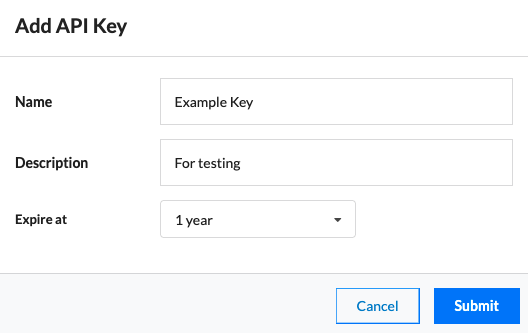
- Select Add new key.
- Give the key a name, a description and an expiry time.
- Copy the key and store it somewhere safe.
Warning
The key value is shown only once, at the point you create it. Cloud cannot show it again. If you lose a key, delete it and generate a replacement.
Delete a key#
- Select the API Key
- Choose Delete in the toolbar
- Follow the prompt to confirm deletion
This cannot be undone.
Edit a key#
- Select the API Key
- Choose Edit in the toolbar
- Edit the key's name, description and toggle the key suspension state
Manage key permissions#
You can manage the scope of a given key by selecting it in the permissions section of the tab. By default, a key is granted all of the site and device permissions available for API Keys. These permissions map to normal user permission access.
API key notes#
Each API key is rate limited to 300 requests per minute per key. Please get in touch if your application is hitting that limit.
Full documentation on how to use the Pharos Cloud API can be found here.